
The Get a Quote page carries the enquiry form. It is built with a plugin called MetForm.
Reading submissions
- Click MetForm in the left menu.
- Open Entries.
- Click any row to read the full submission.
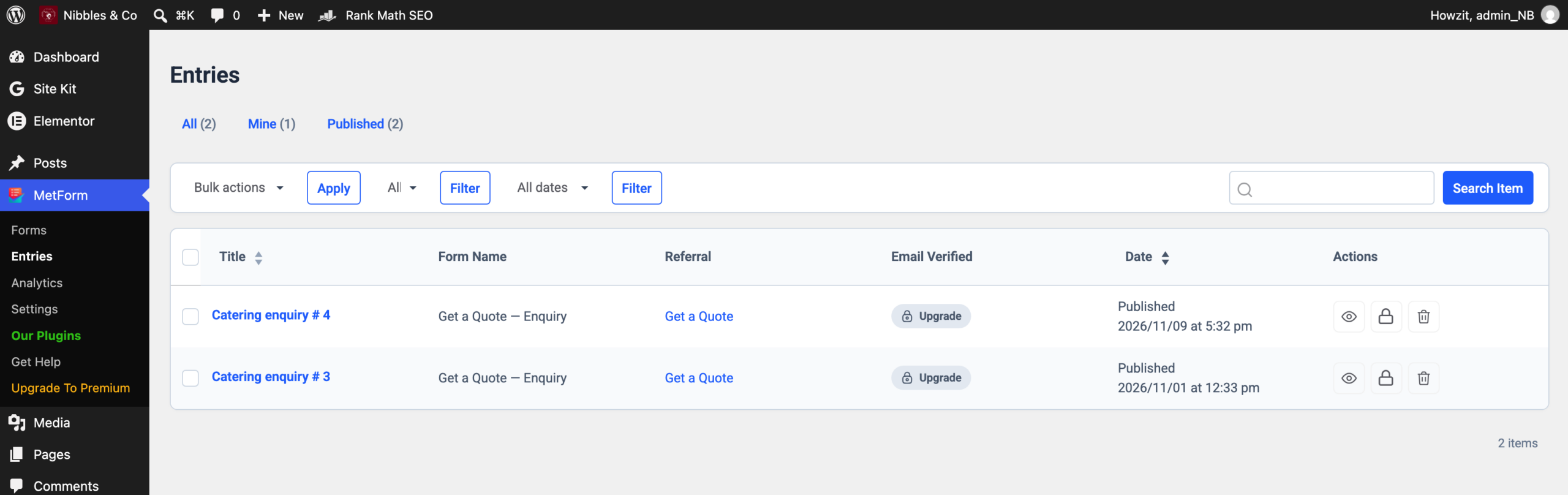
Entries are also emailed. If you are not receiving them, check your spam folder first, then see the Troubleshooting section.
The form itself
The form asks for contact details, the type of event and the date. The event-type field is a searchable dropdown rather than a plain list.
Changing which questions the form asks affects where submissions land and how they are emailed. Treat the form as something to read, not to edit. If a question needs adding or removing, ask Kemoso.
After someone submits
Visitors are sent to the Thank You page. If you want to change the wording there, edit the page at /thank-you like any other.
The site also offers a WhatsApp link, which opens a chat with a message already written. The number it uses is set in the site’s own code, so changing the business WhatsApp number is a job for Kemoso, not a page edit.